Print Settings
Our filament profiles and process profiles for OrcaSlicer and Bambu Studio, tuned for printing Lofted Aero models. Every .3MF project download already contains the relevant settings, but you can download them here if you'd like to import them into your slicer or use them for other projects.
Filament profiles
| Profile | Used by | Download |
|---|---|---|
| Lofted Aero Tuned Generic Foaming LW-PLAFor active foaming LW-PLA — 3DLabPrint, ColorFabb and other brands. | T-38C, F-35A, F-16XL, F-35B VTOL 70mm, F-35B VTOL 90mm, Glow Stick, Mojave | Bambu Studio OrcaSlicer |
| Lofted Aero Tuned Generic PLAFor ordinary PLA or PLA+, tuned for general-use parts. | Most models | Bambu Studio OrcaSlicer |
| Lofted Aero Tuned Generic PLA Thin WallFor PLA or PLA+, with cooling and retraction tuned for thin-wall parts. | ERCO Ercoupe, XQ-58A Valkyrie | Bambu Studio OrcaSlicer |
| Lofted Aero Tuned Generic Foaming TPUFor active foaming TPU, tuned for lightweight and flexible printed tires. | ERCO Ercoupe, XQ-58A Valkyrie, F-35B VTOL 90mm, Glow Stick, Mojave | Bambu Studio OrcaSlicer |
| Lofted Aero Tuned Bambu PLA AeroFor active foaming LW-PLA, optimized for Bambu Aero. | Substitute for Foaming LW-PLA | Bambu Studio OrcaSlicer |
| Lofted Aero Tuned Bambu ASA AeroFor active foaming LW-ASA, optimized for Bambu Aero. Needs a heated enclosure. | Substitute for Foaming LW-PLA, where heat and UV resistance matter | Bambu Studio OrcaSlicer |
| Lofted Aero Tuned ColorFabb LW-ASAFor active foaming LW-ASA, optimized for ColorFabb. Needs a heated enclosure. | Substitute for Foaming LW-PLA, where heat and UV resistance matter | Bambu Studio OrcaSlicer |
Process profiles
| Profile | Used by | Download |
|---|---|---|
| Lofted Aero 0.24mm Thin WallFor airframe parts featuring single-wall skins and custom internal structure. | ERCO Ercoupe, XQ-58A Valkyrie | Bambu Studio OrcaSlicer |
| Lofted Aero 0.28mm LW-PLAFor airframe parts modeled as solids with infill, optimized for LW-PLA. | T-38C, F-35A, F-16XL, F-35B VTOL 70mm, F-35B VTOL 90mm, Mojave | Bambu Studio OrcaSlicer |
| Lofted Aero 0.28mm Vase ModeFor airframe parts modeled as continuous shells. | F-35B VTOL 70mm, F-35B VTOL 90mm, Glow Stick | Bambu Studio OrcaSlicer |
| Lofted Aero 0.28mm Foaming TPUFor foaming TPU tires and flexible parts. | ERCO Ercoupe, XQ-58A Valkyrie, F-35B VTOL 90mm, Glow Stick, Mojave | Bambu Studio OrcaSlicer |
| Lofted Aero 0.20mm LW-ASAFor airframe parts modeled as solids with infill, optimized for LW-ASA. | Substitute for 0.28mm LW-PLA when printing in LW-ASA | Bambu Studio OrcaSlicer |
| Lofted Aero 0.30mm LW-ASAFor airframe parts modeled as solids with infill, optimized for LW-ASA. Intended for 0.6mm nozzles. | Substitute method for parts that would otherwise use two walls printed with an 0.4mm nozzle. | Bambu Studio OrcaSlicer |
Parts like latches, battery trays, wheel hubs, servo and gear mounts print perfectly well on
your slicer's own 0.20mm Standard, which is already matched to your printer. So those portions of Lofted Aero projects don't use custom profiles.
Per-object modifiers
Where one model needs something different — extra perimeters, different infill, or a relocated seam — that's applied as a per-object modifier on top of the profile rather than as another profile. Modifiers survive switching presets; an unsaved project-level override does not.
Each build guide lists the modifiers for its own parts. Be sure to replicate these if you modify projects.
Installing
Same three steps in both slicers:
-
Download the profiles you need from the tables above.
-
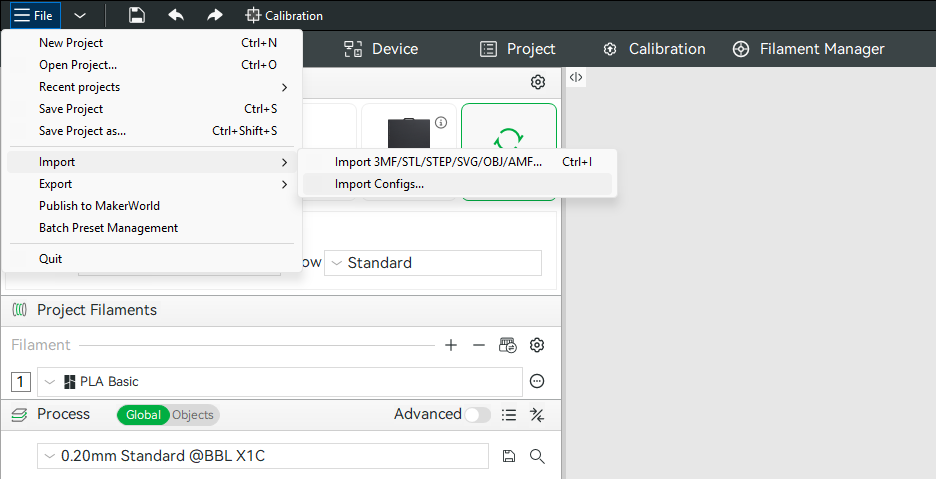
File → Import → Import Configs… Then select the files — you can pick several at once.
-
Now, they'll appear under User Presets in the filament and process dropdowns.
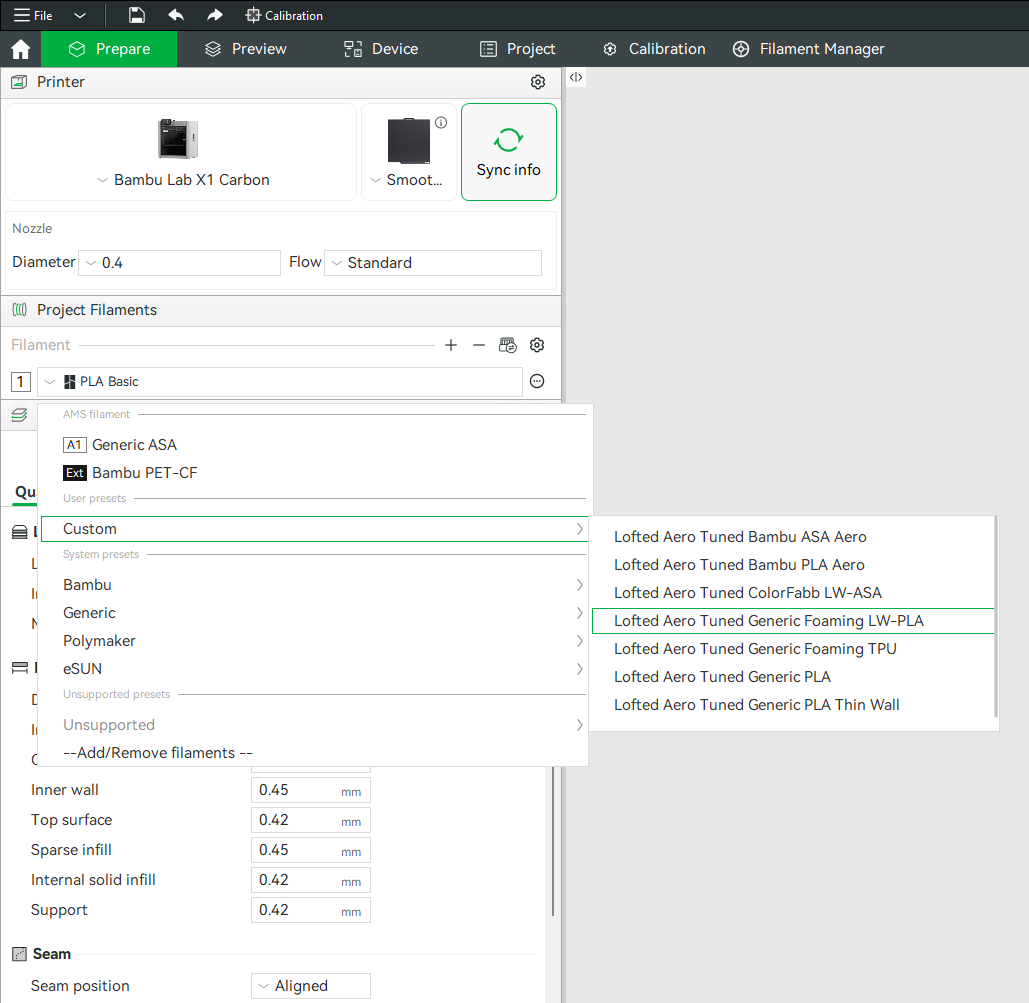
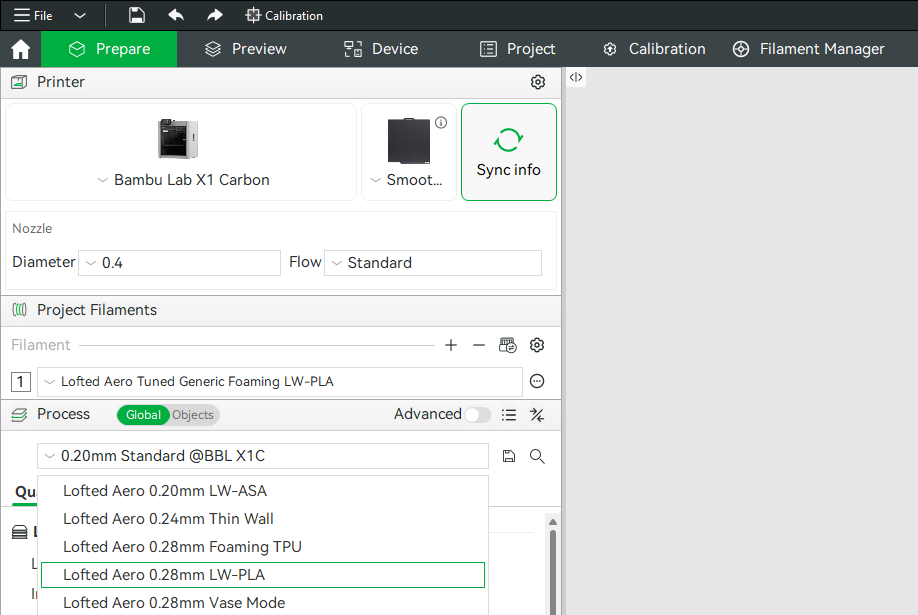
Use the files for the slicer you're actually running. The OrcaSlicer and Bambu Studio versions are genuinely different — the two slicers spell some settings differently and each has settings the other doesn't — so they aren't the same file under two names.
Printer notes
These profiles are standalone — each carries its full settings rather than inheriting from a printer profile, so they import onto anything OrcaSlicer or Bambu Studio supports.
That said, we can't test our profiles on every printer. They should be a sound starting point elsewhere, but treat first prints as a test run and check part weight against the guide's print table.
Non-Bambu printers: clear the filament start G-code
The Generic Foaming LW-PLA and Bambu PLA Aero profiles carry an
M106 P3 line in their filament start G-code. P3 is the Bambu auxiliary
fan; on other firmware that index addresses a different fan, or none at all.
If you notice adverse effects on other printers, clear the filament start G-code.